Benchmarking RTSP Frame Capture in Python

In my previous article, we used OpenCV, PyAV, and GStreamer to read frames from an RTSP camera in Python. All four approaches worked with a single camera, but I wanted to know what happens when we connect to more of them.
Can they still keep up with 10 or 25 camera streams? And how much CPU and memory will they use?
To find out, I ran the four implementations against the same RTSP video sources, using different codecs, resolutions, and camera counts.
What we're testing
We're comparing the same four approaches from the previous article:
| Approach | Python interface | Backend |
|---|---|---|
| OpenCV + FFmpeg | cv2.VideoCapture | FFmpeg |
| OpenCV + GStreamer | cv2.VideoCapture | GStreamer |
| PyAV | av.open() | FFmpeg |
| Native GStreamer | PyGObject + appsink | GStreamer |
Every implementation receives RTSP video, decodes it, and returns BGR NumPy arrays. There is no object detection, video rendering, or image saving during the benchmark.
These are real-time 30 FPS streams. We're measuring whether Python can keep receiving frames as we add cameras, rather than the maximum number of frames a decoder could process from a local file.
Test setup
I used one roughly one-minute traffic video and created four versions of the same footage:
| Resolution | H.264 bitrate | H.265 bitrate |
|---|---|---|
| 720p (1280 × 720) | 3.25 Mbps | 1.44 Mbps |
| 1080p (1920 × 1080) | 6.73 Mbps | 2.62 Mbps |
All four files have 30 FPS, 1,882 frames, and a duration of 62.73 seconds. The H.264 and H.265 versions were encoded with different quality settings, so the files do not provide a controlled comparison of codec compression efficiency.
FFmpeg looped and published the files to MediaMTX as separate virtual camera streams, without re-encoding during publishing. Each simulated camera used a different RTSP endpoint.
The RTSP server, FFmpeg publishers, and Python receivers ran on the same computer. This matters when interpreting the results, especially when the CPU becomes saturated.
Test machine
| Component | Configuration |
|---|---|
| CPU | AMD Ryzen 7 3800X, 8 cores / 16 threads |
| RAM | 32 GB |
| GPU | NVIDIA RTX 2080 SUPER (not used for decoding) |
| OS | Linux, kernel 7.0.0-38-generic |
| Python | 3.14.6 |
| OpenCV / PyAV | 5.0.0 / 19.0.1 |
| GStreamer / FFmpeg | 1.24.2 / 6.1.1 |
| MediaMTX | 1.21.1 |
How the benchmark ran
For every implementation, I tested 1, 5, 10, and 25 cameras at both resolutions and with both codecs. Every connection used RTSP over TCP and software decoding.
I used one Python worker process per camera, with one decoder thread per camera. Each run had a 10-second warm-up followed by 45 seconds of measurement. Every configuration was repeated three times, with a randomized execution order.
That gives us 64 configurations and 192 benchmark runs.
I recorded decoded FPS, receiver CPU usage, memory usage, time to first frame, and interruptions. CPU and memory measurements refer to the Python receiver processes, not the FFmpeg publishers or MediaMTX.
The GStreamer pipelines used a 200 ms RTSP jitter buffer and a one-buffer appsink with dropping disabled, while the FFmpeg-based approaches retained their respective library-default buffering. These results therefore reflect the specific implementations and settings, including their buffering behavior.
Results
Up to 10 cameras, every approach kept up
The input streams produce 30 FPS each, which gives us these expected aggregate frame rates:
| Cameras | Expected decoded FPS |
|---|---|
| 1 | 30 |
| 5 | 150 |
| 10 | 300 |
| 25 | 750 |
At 720p, every approach stayed close to the expected frame rate, even with 25 cameras. At 1080p, the same was true for 1, 5, and 10 cameras.
FPS did not separate the implementations much at those loads. The differences appeared when I increased the number of 1080p streams to 25.
25 cameras at 1080p: PyAV stayed closest to 30 FPS
With 25 cameras, the target is 750 aggregate FPS:
| Approach | H.264 (FPS) | H.265 (FPS) |
|---|---|---|
| OpenCV + FFmpeg | 526.5 ± 7.8 | 504.2 ± 0.1 |
| OpenCV + GStreamer | 451.4 ± 0.5 | 447.1 ± 4.3 |
| PyAV | 730.0 ± 9.5 | 691.2 ± 1.5 |
| Native GStreamer | 340.8 ± 0.5 | 341.5 ± 0.8 |
Mean ± sample standard deviation across three runs per configuration.
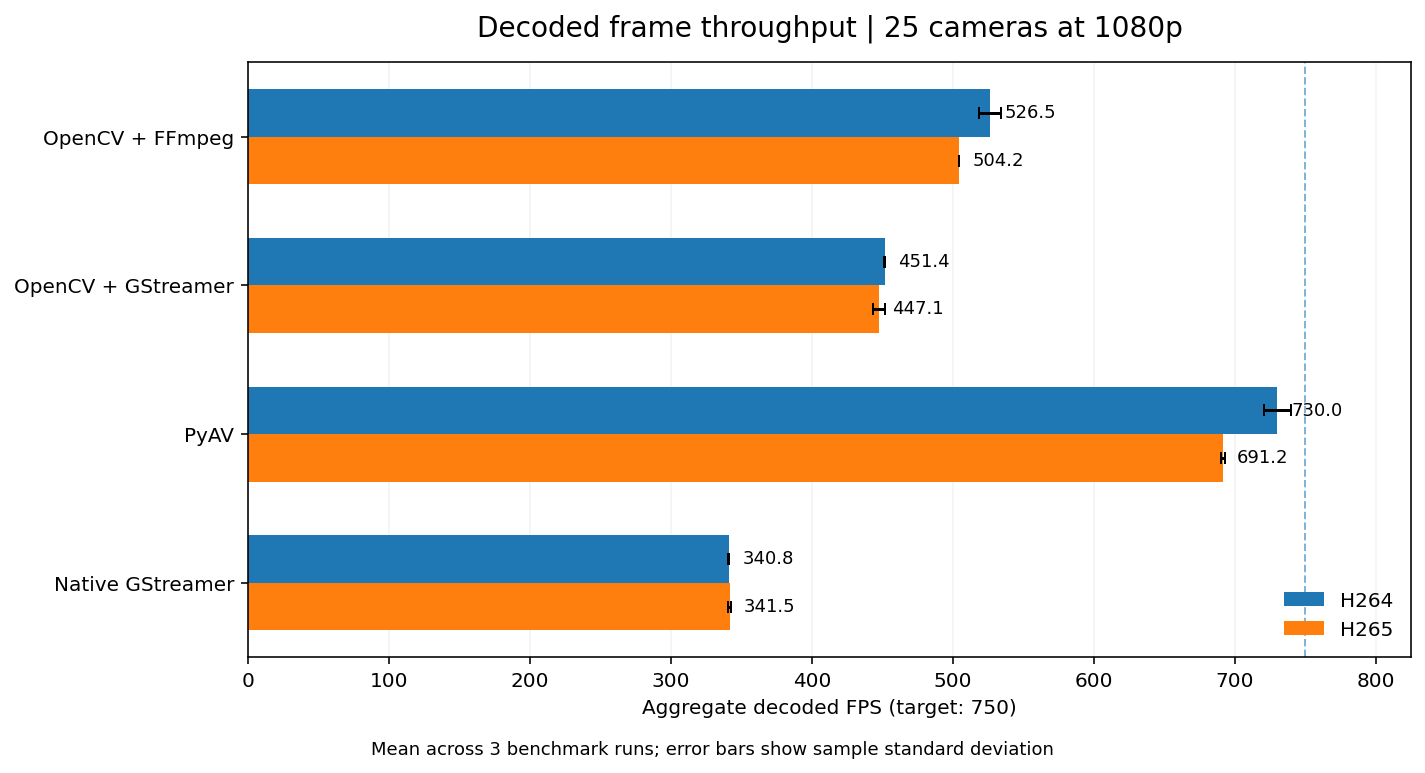
PyAV delivered 97.3% of the expected frames with H.264 and 92.2% with H.265. OpenCV + FFmpeg reached about 70.2% and 67.2%, respectively. The two GStreamer implementations fell further behind in this setup.
The gap was large even though every implementation was reading the same footage at the same resolution and frame rate.
A completed run isn't the same as receiving every expected frame. All 192 runs completed, but the 25-camera 1080p workloads exceeded what some configurations could sustain.
CPU usage: OpenCV + FFmpeg used less at 720p
At 720p with 25 cameras, all four approaches maintained approximately 750 aggregate FPS. Since every approach delivered essentially the same number of frames, we can compare how much CPU each one consumed.
| Approach | H.264 receiver CPU | H.265 receiver CPU |
|---|---|---|
| OpenCV + FFmpeg | 19.3% | 20.4% |
| OpenCV + GStreamer | 27.4% | 27.3% |
| PyAV | 27.6% | 28.3% |
| Native GStreamer | 36.8% | 36.1% |

The results are expressed as a percentage of the machine's total logical CPU capacity. Our Ryzen 7 3800X has 16 logical CPUs, so 100% represents the combined capacity of all 16 logical CPUs. The summed receiver CPU measurements are divided by 16.
OpenCV + FFmpeg used around 19–20%, while PyAV and OpenCV + GStreamer used approximately 27–28%. Native GStreamer consumed the most, at around 36–37%. These percentages only include the Python receiver processes and exclude FFmpeg publishers and MediaMTX.
When each approach could sustain the source frame rate, OpenCV + FFmpeg used the least CPU in these tests.
At 25 cameras running 1080p, however, the host CPU reached approximately 99–100% utilization. The publishers and receivers were competing for the same CPU resources, which limits how much we can attribute the throughput differences to the capture libraries alone.
Memory usage: PyAV used the least at 25 × 1080p
I used Proportional Set Size (PSS) for the memory comparison. Unlike summing each process's RSS, PSS apportions shared memory pages across processes, making it more useful for our process-per-camera setup.
| Approach | H.264 receiver PSS | H.265 receiver PSS |
|---|---|---|
| OpenCV + FFmpeg | 1.77 GiB | 2.43 GiB |
| OpenCV + GStreamer | 2.74 GiB | 2.82 GiB |
| PyAV | 1.52 GiB | 1.67 GiB |
| Native GStreamer | 3.09 GiB | 3.06 GiB |
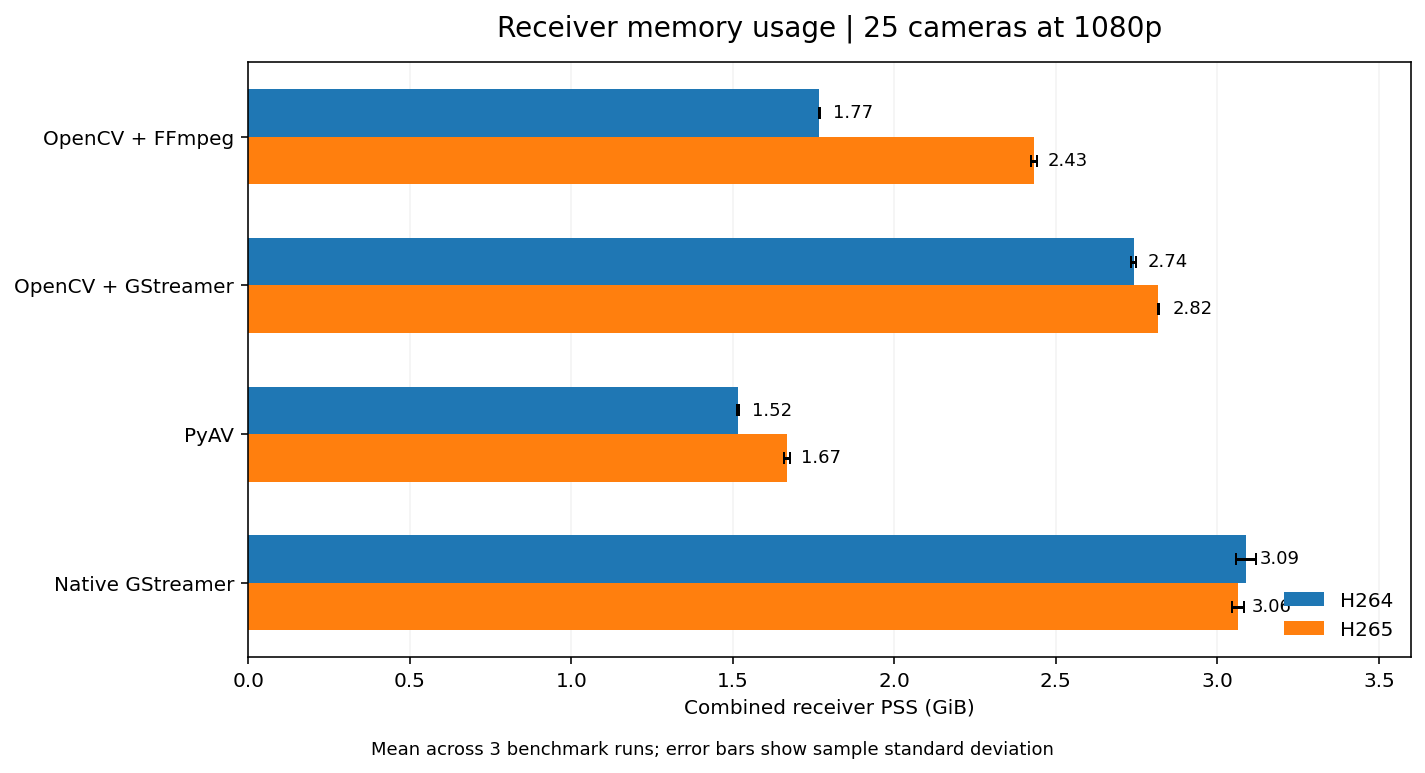
PyAV had the lowest combined receiver PSS in both 1080p codec tests. A different concurrency model might change the memory usage.
Startup time and stream stability
I also measured how long each approach took to deliver its first decoded BGR frame after opening a single 1080p RTSP stream.
| Approach | H.264 | H.265 |
|---|---|---|
| OpenCV + FFmpeg | 5.71 s | 0.85 s |
| OpenCV + GStreamer | 1.17 s | 1.12 s |
| PyAV | 5.75 s | 5.68 s |
| Native GStreamer | 1.21 s | 1.15 s |
The numbers vary by codec and implementation. They reflect the tested connection and buffering behavior, including when a subscriber joins the stream and waits for a decodable frame. I wouldn't treat this as a universal startup-speed ranking, and it isn't a measurement of camera-to-Python latency.
Across all 1,968 per-camera measurements, the benchmark recorded only eight frame gaps longer than one second. There were no failed benchmark runs, although many 25-camera 1080p streams delivered fewer than 30 FPS.
What the results tell us
For small to moderate camera counts, all four approaches maintained the expected FPS. I would still start with OpenCV + FFmpeg for a straightforward computer vision application: it has a simple Python interface, and in our 720p tests it used the least CPU while keeping up with all 25 cameras.
For 25 simultaneous 1080p streams, PyAV performed noticeably better in this setup. It delivered the most decoded frames and used the least receiver memory. If I were building a higher-density RTSP capture service on similar hardware, I'd take a closer look at PyAV.
GStreamer is still useful when an application needs a custom media pipeline. The results do not establish that GStreamer itself is slower. They reflect these particular pipelines, buffer settings, Python interfaces, and a process-per-camera design.
Limitations
These results do not provide a universal ranking.
- One machine: RTSP publishing, MediaMTX, and frame capture all shared the same CPU. The heaviest tests were CPU-saturated.
- One source video: We looped the same recorded footage into different RTSP endpoints, rather than using independent physical CCTV cameras on a real network.
- Specific settings: We used TCP, software decoding, one Python process per camera, and the buffering settings described above. Different settings could change the outcome.
- Three repetitions: The large differences were consistent across the runs, but other hardware and workloads still need testing.
- Codec differences: The H.264 and H.265 files had different bitrates and encoding quality settings. This is not a controlled codec-efficiency study.
Finally, decoded FPS measures how well Python kept up with a live stream. We did not measure end-to-end camera latency or exact dropped-frame counts.
Conclusion
I would start with OpenCV + FFmpeg for a straightforward computer vision application. Its Python interface is simple, and it used the least CPU in the 25-camera 720p test, where all four approaches kept up with the source frame rate.
For a workload closer to 25 simultaneous 1080p streams, I would choose PyAV. It delivered 730 aggregate FPS with H.264 and 691 FPS with H.265, while using the least receiver memory in both tests. GStreamer would be my choice when I need a custom media pipeline, but these results do not support choosing it for throughput alone.
At 25 cameras and 1080p, the host CPU was saturated. These results therefore apply to this hardware, buffering configuration, and process-per-camera design. Use them as a starting point, then test the workload you plan to run before choosing an implementation.